Getting Started with bayespecon
This notebook walks through a complete spatial econometric workflow:
Simulate spatial data from a known DGP
Fit a baseline OLS model
Run Bayesian LM diagnostics to test for spatial dependence
Use the decision tree to select a better model
Fit the recommended SAR model
Compute direct, indirect, and total spatial effects
Peek at the underlying PyMC model for customization
import libpysal

from bayespecon.dgp import simulate_sar

gdf = simulate_sar(n=20, beta=[1, 0.4, 2.5], rho=0.6, create_gdf=True)
gdf
| y | X_0 | X_1 | X_2 | geometry | |
|---|---|---|---|---|---|
| 0 | -5.231147 | 1.0 | -0.439803 | -1.643693 | POLYGON ((1 0, 1 1, 0 1, 0 0, 1 0)) |
| 1 | -1.516225 | 1.0 | -0.469128 | -0.041409 | POLYGON ((2 0, 2 1, 1 1, 1 0, 2 0)) |
| 2 | 0.955687 | 1.0 | -0.301342 | -0.492644 | POLYGON ((3 0, 3 1, 2 1, 2 0, 3 0)) |
| 3 | -2.721767 | 1.0 | 0.166715 | -1.520066 | POLYGON ((4 0, 4 1, 3 1, 3 0, 4 0)) |
| 4 | 0.158253 | 1.0 | -0.419888 | -0.056810 | POLYGON ((5 0, 5 1, 4 1, 4 0, 5 0)) |
| ... | ... | ... | ... | ... | ... |
| 395 | 2.219517 | 1.0 | -1.449830 | 0.472229 | POLYGON ((16 19, 16 20, 15 20, 15 19, 16 19)) |
| 396 | 1.903429 | 1.0 | -0.376461 | 0.061293 | POLYGON ((17 19, 17 20, 16 20, 16 19, 17 19)) |
| 397 | -2.915891 | 1.0 | -0.004232 | -0.641885 | POLYGON ((18 19, 18 20, 17 20, 17 19, 18 19)) |
| 398 | -2.475098 | 1.0 | -2.207240 | -1.483197 | POLYGON ((19 19, 19 20, 18 20, 18 19, 19 19)) |
| 399 | 1.422373 | 1.0 | 0.936024 | -0.373176 | POLYGON ((20 19, 20 20, 19 20, 19 19, 20 19)) |
400 rows × 5 columns
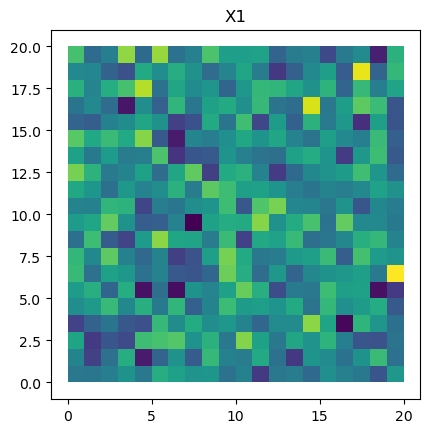
gdf.plot("X_1").set_title("X1")
Text(0.5, 1.0, 'X1')
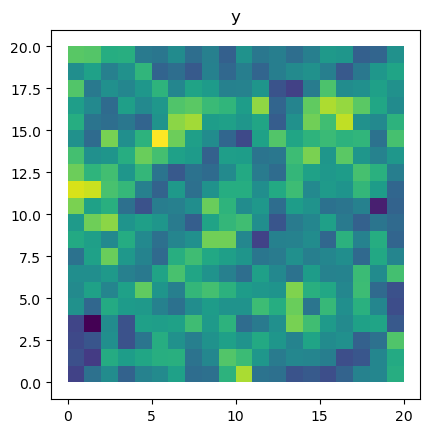
gdf.plot("y").set_title("y")
Text(0.5, 1.0, 'y')
1. Create a Spatial Weights Matrix
Spatial econometric models require a spatial weights matrix \(W\) that encodes the spatial relationships between observations. Here we use Rook contiguity (regions that share a boundary or vertex are neighbors).
G = libpysal.graph.Graph.build_contiguity(gdf, rook=False).transform("r")
2. Fit a Baseline OLS Model
We start with a non-spatial OLS regression to establish a baseline.
# remove the intercept since we have one (-1)
form = "y ~ -1 + X_0 + X_1 + X_2"
from bayespecon import OLS

ols = OLS(formula=form, W=G, data=gdf)
ols.fit(draws=1000, tune=500, chains=2, random_seed=42)
ols.summary()
Initializing NUTS using jitter+adapt_diag...
Multiprocess sampling (2 chains in 2 jobs)
NUTS: [beta, sigma2]
Sampling 2 chains for 500 tune and 1_000 draw iterations (1_000 + 2_000 draws total) took 6 seconds.
We recommend running at least 4 chains for robust computation of convergence diagnostics
/home/runner/micromamba/envs/test/lib/python3.14/site-packages/rich/live.py:260: UserWarning: install "ipywidgets"
for Jupyter support
  warnings.warn('install "ipywidgets" for Jupyter support')
| mean | sd | hdi_3% | hdi_97% | mcse_mean | mcse_sd | ess_bulk | ess_tail | r_hat | |
|---|---|---|---|---|---|---|---|---|---|
| X_0 | 1.993 | 0.081 | 1.829 | 2.132 | 0.002 | 0.002 | 2247.0 | 1478.0 | 1.01 |
| X_1 | 0.497 | 0.088 | 0.324 | 0.650 | 0.002 | 0.002 | 1890.0 | 1445.0 | 1.00 |
| X_2 | 2.832 | 0.079 | 2.683 | 2.975 | 0.002 | 0.002 | 2452.0 | 1633.0 | 1.00 |
| sigma2 | 2.651 | 0.188 | 2.296 | 2.996 | 0.004 | 0.004 | 1953.0 | 1616.0 | 1.00 |
| sigma | 1.627 | 0.058 | 1.525 | 1.740 | 0.001 | 0.001 | 1953.0 | 1616.0 | 1.00 |
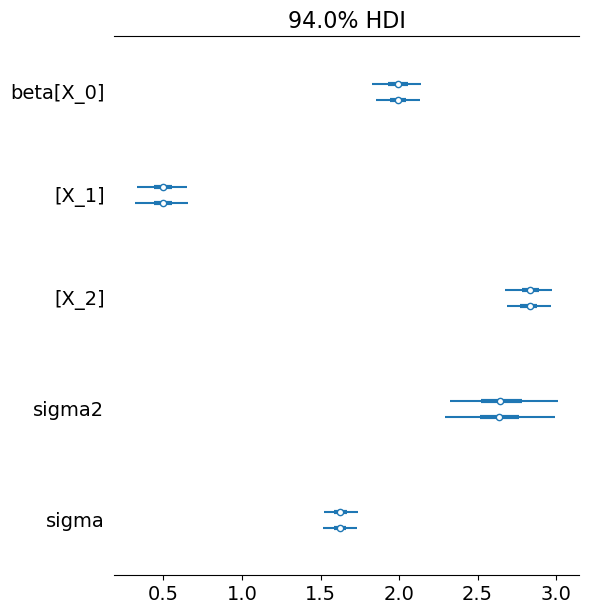
Notice all the estimated beta parameters are biased upward.
Use arviz to inspect fit
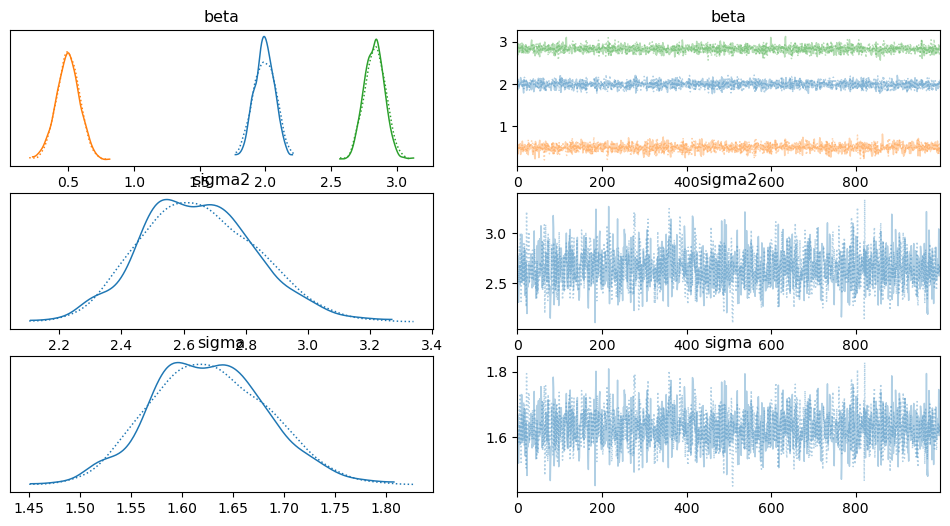
the fit method attaches an inference_data object to each model that can be used directly with arviz functions
import arviz as az

az.plot_forest(ols.inference_data)
array([<Axes: title={'center': '94.0% HDI'}>], dtype=object)
az.plot_trace(ols.inference_data)
array([[<Axes: title={'center': 'beta'}>,
        <Axes: title={'center': 'beta'}>],
       [<Axes: title={'center': 'sigma2'}>,
        <Axes: title={'center': 'sigma2'}>],
       [<Axes: title={'center': 'sigma'}>,
        <Axes: title={'center': 'sigma'}>]], dtype=object)
3. Run Bayesian LM Diagnostics
The spatial_diagnostics() method runs a battery of Bayesian LM tests (Doğan, Taşpınar & Bera 2021) that check whether spatial dependence is present in the residuals.
LM-Lag: Tests \(H_0: \rho = 0\) (no spatial lag on \(y\))
LM-Error: Tests \(H_0: \lambda = 0\) (no spatial error correlation)
LM-SDM-Joint: Joint test for \(\rho = 0\) and \(\gamma = 0\)
Robust-LM-Lag / Robust-LM-Error: Neyman-orthogonal robust versions
diag = ols.spatial_diagnostics()
diag
| statistic | median | df | p_value | ci_lower | ci_upper | |
|---|---|---|---|---|---|---|
| test | ||||||
| LM-Lag | 365.127729 | 363.730347 | 1 | 0.000000 | 282.437440 | 454.417382 |
| LM-Error | 216.777765 | 215.063816 | 1 | 0.000000 | 164.326858 | 274.453851 |
| LM-SDM-Joint | 385.532946 | 379.712057 | 3 | 0.000000 | 282.639936 | 519.655667 |
| LM-SLX-Error-Joint | 384.560787 | 383.399958 | 3 | 0.000000 | 325.160854 | 450.706092 |
| Robust-LM-Lag | 169.827039 | 168.504134 | 1 | 0.000000 | 127.256387 | 220.933707 |
| Robust-LM-Error | 16.226200 | 16.099803 | 1 | 0.000056 | 12.158768 | 21.109210 |
4. Model Selection Decision Tree
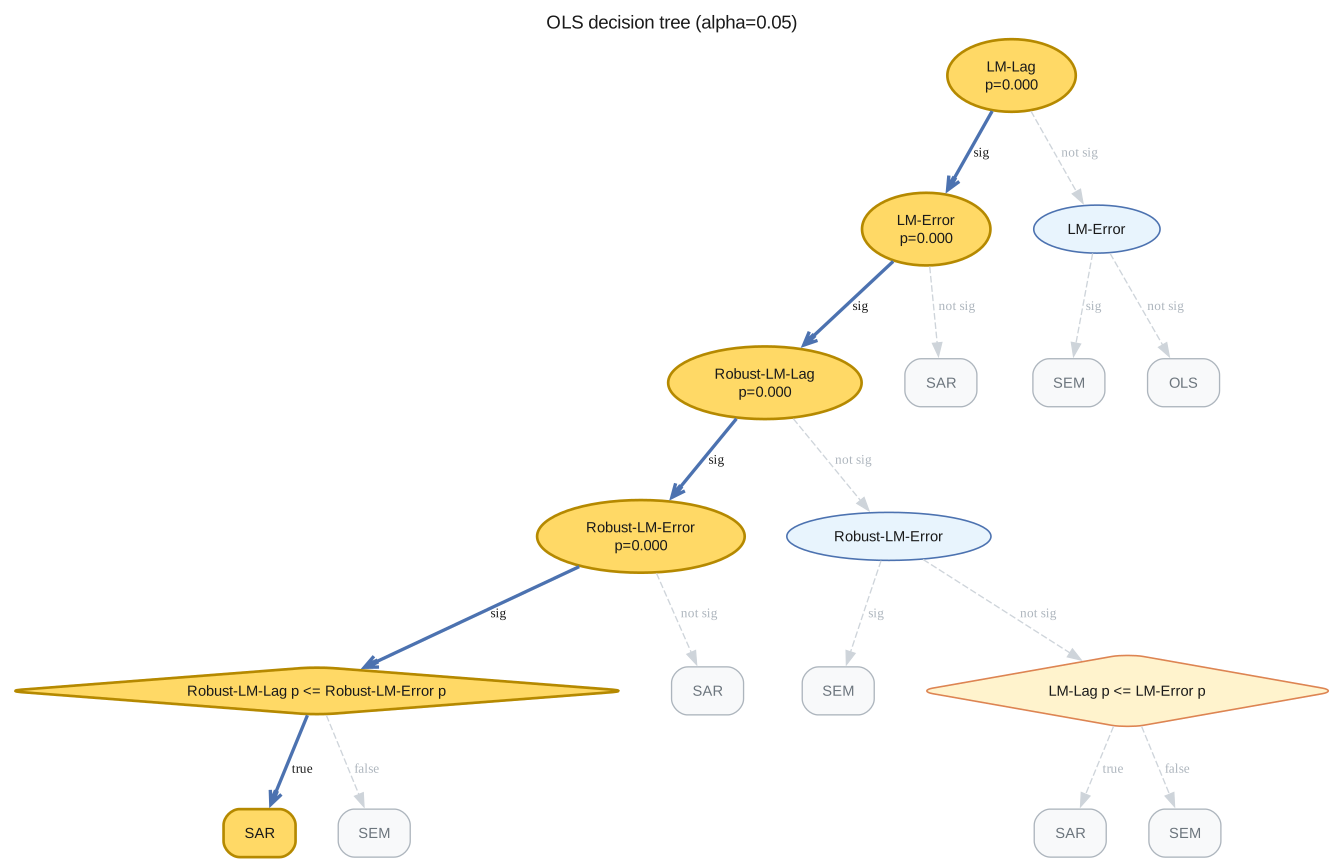
The spatial_diagnostics_decision() method walks a Koley & Bera decision tree using the Bayesian p-values above and recommends the next model to fit.
decision = ols.spatial_diagnostics_decision(alpha=0.05, format="ascii")
print(decision)
LM-Lag *  (p=0.0000, alpha=0.05)
├── <sig> LM-Error *  (p=0.0000, alpha=0.05)
│   ├── <sig> Robust-LM-Lag *  (p=0.0000, alpha=0.05)
│   │   ├── <sig> Robust-LM-Error *  (p=0.0001, alpha=0.05)
│   │   │   ├── <sig> Robust-LM-Lag p <= Robust-LM-Error p *
│   │   │   │   ├── [SAR] * ← SELECTED
│   │   │   │   └── [SEM]
│   │   │   └── [SAR]
│   │   └── <not sig> Robust-LM-Error
│   │       ├── [SEM]
│   │       └── <not sig> LM-Lag p <= LM-Error p
│   │           ├── [SAR]
│   │           └── [SEM]
│   └── [SAR]
└── <not sig> LM-Error
    ├── [SEM]
    └── [OLS]
ols.spatial_diagnostics_decision(alpha=0.05)
5. Fit the Recommended SAR Model
If the diagnostics suggest spatial dependence, we fit a Spatial Autoregressive (SAR) model:
The likelihood includes the Jacobian \(\log|I - \rho W|\) so that posterior inference on \(\rho\) is exact.
from bayespecon import SAR

sar = SAR(formula=form, W=G, data=gdf)
sar.fit(draws=2000, tune=100, chains=4, random_seed=42)
sar.summary()
/home/runner/micromamba/envs/test/lib/python3.14/site-packages/rich/live.py:260: UserWarning: install "ipywidgets"
for Jupyter support
  warnings.warn('install "ipywidgets" for Jupyter support')
Sampling 4 chains for 100 tune and 2000 draw iterations, 4 x 2,100 draws total took 5s (1758 draws/s)
| mean | sd | hdi_3% | hdi_97% | mcse_mean | mcse_sd | ess_bulk | ess_tail | r_hat | |
|---|---|---|---|---|---|---|---|---|---|
| rho | 0.608 | 0.028 | 0.556 | 0.660 | 0.000 | 0.000 | 7999.0 | 5938.0 | 1.0 |
| sigma | 1.095 | 0.039 | 1.021 | 1.166 | 0.000 | 0.000 | 7699.0 | 7595.0 | 1.0 |
| sigma2 | 1.200 | 0.085 | 1.042 | 1.359 | 0.001 | 0.001 | 7699.0 | 7595.0 | 1.0 |
| X_0 | 0.969 | 0.072 | 0.832 | 1.101 | 0.001 | 0.001 | 7922.0 | 7648.0 | 1.0 |
| X_1 | 0.402 | 0.057 | 0.298 | 0.512 | 0.001 | 0.000 | 7957.0 | 7805.0 | 1.0 |
| X_2 | 2.549 | 0.056 | 2.447 | 2.656 | 0.001 | 0.000 | 8017.0 | 7914.0 | 1.0 |
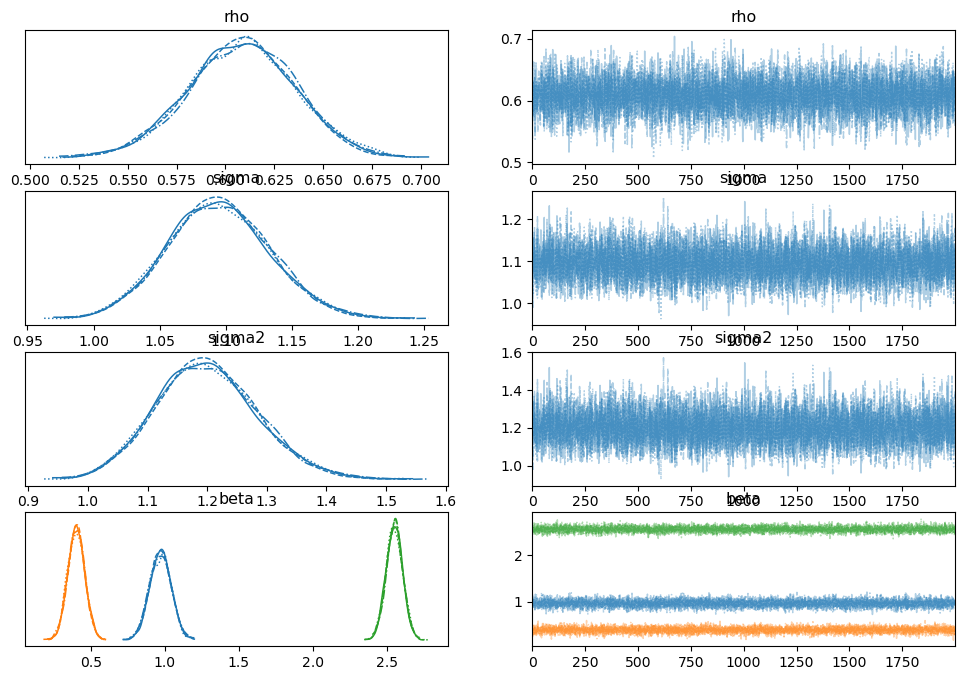
az.plot_trace(sar.inference_data)
array([[<Axes: title={'center': 'rho'}>, <Axes: title={'center': 'rho'}>],
       [<Axes: title={'center': 'sigma'}>,
        <Axes: title={'center': 'sigma'}>],
       [<Axes: title={'center': 'sigma2'}>,
        <Axes: title={'center': 'sigma2'}>],
       [<Axes: title={'center': 'beta'}>,
        <Axes: title={'center': 'beta'}>]], dtype=object)
6. Compute Spatial Effects
For the SAR model, a change in \(X\) propagates through the spatial multiplier \((I - \rho W)^{-1}\). The effects decompose into:
Direct: Effect of \(X_i\) on \(y_i\) (own-region)
Indirect: Effect of \(X_j\) on \(y_i\) for \(j \neq i\) (spillover)
Total: Direct + Indirect
effects = sar.spatial_effects()
effects
| direct | direct_ci_lower | direct_ci_upper | direct_pvalue | indirect | indirect_ci_lower | indirect_ci_upper | indirect_pvalue | total | total_ci_lower | total_ci_upper | total_pvalue | |
|---|---|---|---|---|---|---|---|---|---|---|---|---|
| variable | ||||||||||||
| X_1 | 0.434117 | 0.313930 | 0.556789 | 0.0 | 0.597965 | 0.403382 | 0.838954 | 0.0 | 1.032082 | 0.725351 | 1.378414 | 0.0 |
| X_2 | 2.751963 | 2.624186 | 2.881137 | 0.0 | 3.790026 | 2.979504 | 4.741857 | 0.0 | 6.541989 | 5.653011 | 7.589003 | 0.0 |